Buying guide
What Is the Quietest Air Purifier Setting for Sleeping in a Dorm?
Sleep mode is usually the quietest air purifier setting. What the LEVOIT Core 200S manual says about sleep mode, display off, night light and timers.
Editorial buying guide · Updated · ByDorm Room Compass Editorial Team ·Editorial policy ·Methodology
Short answer: sleep mode, with the lights handled separately
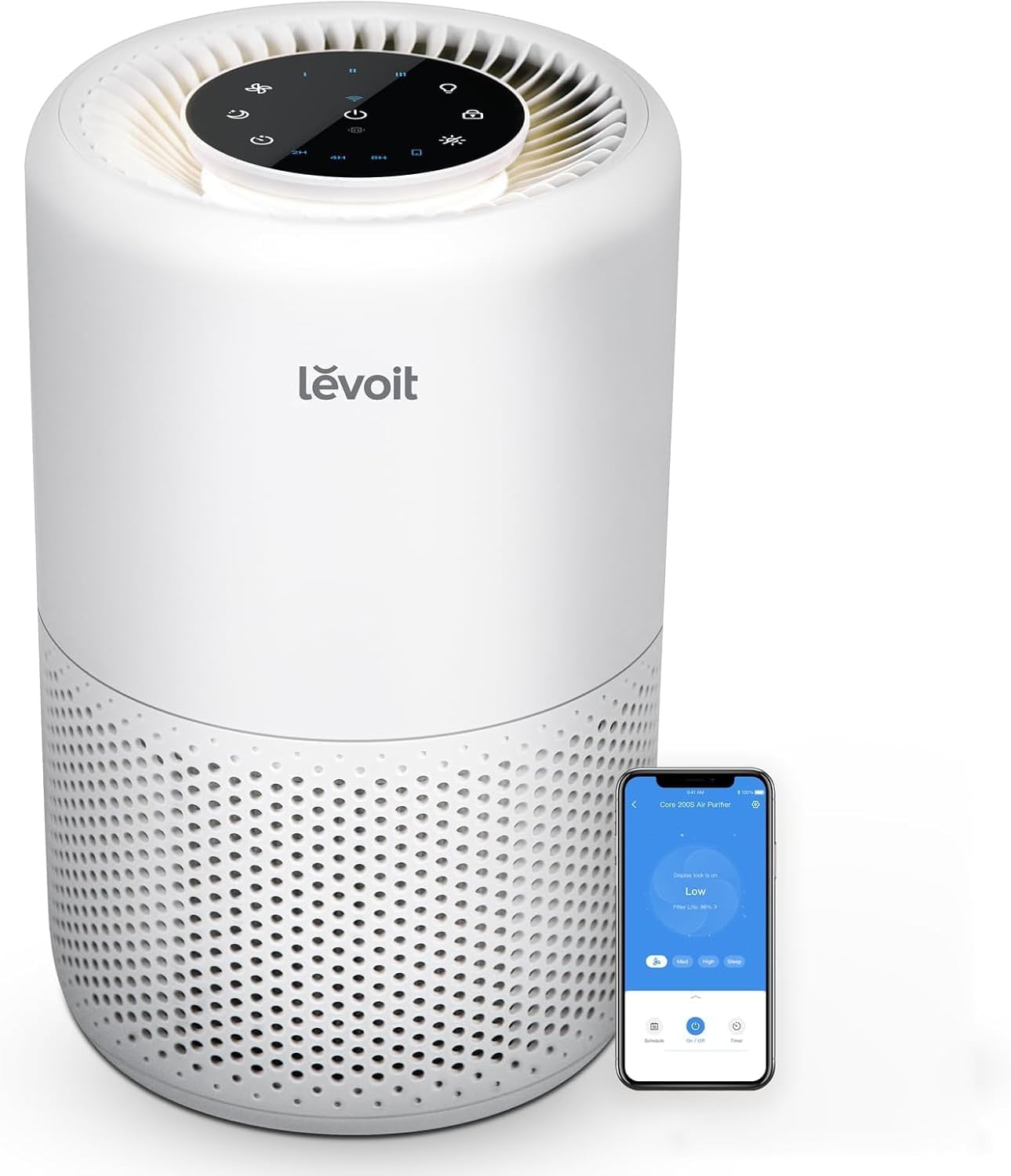
On most compact air purifiers, the quietest setting is sleep mode, not the lowest numbered fan speed. On the LEVOIT Core 200S, the user manual says sleep mode “operates quietly by using a fan speed lower than fan speed I” and turns the display completely off within 6 seconds. LEVOIT’s product page and the Amazon listing give noise “as low as 27dB” in sleep mode, and LEVOIT publishes a full noise range of 27–48 dB.
Two catches matter in a shared dorm room:
- Quiet costs airflow. A lower fan speed moves less air through the filter each hour.
- The night light is not the display. On the Core 200S, turning off the display does not turn off the night light. You switch that off with its own button.
We have not tested this purifier or measured its noise. Every figure below is a manufacturer or listing claim, checked Oct 19, 2026.
What each Core 200S setting does at night
The Core 200S has three fan speeds plus sleep mode. Here is what LEVOIT’s current US manual (model Core 200S, LAP-C201S-AUSR) and product page say about each one.
| Setting | What LEVOIT says | Published noise figure | Display at night |
|---|---|---|---|
| Sleep mode | Uses a fan speed lower than speed I | “As low as 27dB” (product page and Amazon listing) | Turns completely off within 6 seconds; any button except power wakes it |
| Speed I (low) | The default speed when you switch it on | No per-speed figure published | Stays on unless you press Display Off |
| Speed II (medium) | Middle setting | No per-speed figure published | Stays on unless you press Display Off |
| Speed III (high) | “The loudest, but cleans air the quickest” | No per-speed figure published; the published range tops out at 48 dB | Stays on unless you press Display Off |
LEVOIT does not publish a decibel figure for each fan speed, only the 27–48 dB range. So the honest comparison is the order, not exact numbers: sleep mode is the quietest, speed III is the loudest, and speeds I and II sit between. Decibels are logarithmic, so a gap of about 20 dB between the bottom and top of that range is a large, easy-to-hear difference, not a small step.
Check which version you have
Older Core 200S manuals list different specifications from the current product page, including a different noise range and CADR. If you already own one, check the model and specification table in the manual that came in your box. If you are buying, compare the current listing against LEVOIT’s current product page, which lists a 90 CFM CADR and 27–48 dB for the Core 200S-P.
The tradeoff: quiet setting vs. air moved
Running a purifier on its quietest setting all night is a reasonable choice, but know what you give up. EPA’s guide to air cleaners notes that CADR is usually measured at a purifier’s highest speed, and that more air moves through the filter at higher fan speeds. At sleep mode, actual airflow is lower than the 90 CFM rating.
The what size air purifier do I need for a dorm room guide walks through the room-size math. By EPA’s sizing chart, a 90 CFM CADR fits a room of roughly 138 square feet with an 8-foot ceiling, and that is at full speed. If you will run the purifier mostly on sleep mode, a room near that limit is a reason to pick a larger unit or to run a higher speed when you are not trying to sleep.
A simple routine that fits most shared rooms:
- While you are out or awake: run speed II or III. Noise matters less, and you get more airflow.
- Before lights-out: switch to sleep mode. The manual also suggests that for a specific issue such as smoke, you run the purifier on speed III for 15–20 minutes before you lower the speed.
- Overnight: leave it on sleep mode, with the night light off.
- Keep the door and windows closed while it runs. The manual says this helps it work as intended.
How to make the Core 200S dark and quiet overnight
Based on the manual’s controls section:
- Turn on sleep mode with the sleep mode (moon) button. The display goes dark within about 6 seconds. Tapping the fan speed button exits sleep mode.
- Turn off the night light. The night light button cycles through on, half brightness, and off. The manual notes that turning off the display “will not turn off the night light,” so check it separately.
- Lock the display if it gets bumped. Press and hold the lock button for 3 seconds so an accidental tap does not change the speed in the middle of the night.
- Use the timer if you only want it running part of the night. The display offers 2-, 4-, and 8-hour timers, and the VeSync app allows 1–24 hours. The purifier turns off when the timer ends.
- Set a schedule in the app if you prefer. The VeSync app supports schedules, which can switch modes on a routine.
What resets after a power cut or unplug
Dorm outlets get unplugged for cleaning, room checks, and breaks. According to the manual, when unplugged the Core 200S remembers its fan speed and sleep mode, but not Display Lock or Display Off. Timers and night light settings are not covered by the memory function. After a power interruption, check that the lights are still off before you go to sleep.
Placement changes how loud it seems
The same setting can seem louder or quieter depending on where the purifier sits:
- Give it clearance. The manual asks for a flat, stable surface and at least 15 inches (38 cm) of clearance on all sides, away from anything that blocks airflow, such as curtains. Squeezing it against a bed frame or wall to keep it “out of the way” goes against that instruction.
- Keep it off soft, uneven surfaces. A stable floor spot or sturdy desk corner is better than a pile of laundry or a wobbly shelf.
- Do not put it directly next to a pillow. A few feet of distance on a clear spot is usually easier to sleep near than a unit right beside your head.
- Keep the cord off walking paths, especially near loft ladders, so a late-night trip does not knock it over or unplug it.
Agree on it with your roommate first
In a double, the quietest setting is partly a roommate decision. Before the first night, agree on:
- Whether the purifier runs overnight at all, and on which setting
- Night light off or half brightness
- Where it sits, so it is not right next to one person’s bed
- Who handles the filter check, since the manual says the check filter indicator should light up within 6–8 months depending on use (see LEVOIT Core 200S filter replacement for the steps)
If one of you is bothered by any steady fan sound, a timer that shuts it off after you fall asleep may be a better compromise than running it all night.
When the quietest setting is not the answer
- The room is too big for the unit. If your room is well above the purifier’s sizing at full speed, sleep mode will move even less air relative to the space. Size up instead of relying on the lowest setting. Use the dorm air purifier size guide to check.
- You actually want cooling. A purifier filters air; it does not cool a room. If heat is keeping you awake, compare formats with dorm fan vs air purifier.
- The problem is light, not sound. If a roommate’s desk lamp or the hallway is the real issue, a sleep mask may solve it more directly. See dorm room comfort essentials.
- Your housing policy does not allow it. Confirm that plug-in purifiers are permitted in your room before you buy. Use the dorm room buying checklist for the wider policy-first filter.
If you are still choosing among compact models, the best air purifier for dorm room shortlist lines up stated room size, noise, and footprint for four units.
Where the LEVOIT Core 200S fits
The LEVOIT Core 200S air purifier review covers the product in full. For overnight use, these are the published points that matter:
- Sleep mode: a fan speed below speed I, display off within 6 seconds, noise “as low as 27dB” (LEVOIT and Amazon listing)
- Noise range: 27–48 dB (LEVOIT product page; no per-speed breakdown)
- Lights: a separate night light with two brightness levels and off; a Display Off button; a display lock
- Timers: 2, 4, or 8 hours on the unit; 1–24 hours and schedules in the VeSync app
- Size: 8.1 × 8.1 × 12.6 inches, 6.6 lb; 90 CFM CADR (LEVOIT product page)
- Price: listed at $89.99 on Amazon, with a 4.7-star average from 35,708 ratings, as of Oct 26, 2026
Prices and ratings change, so check the live listing before you buy.
Our evidence boundary
This guide is based on LEVOIT’s current US user manual for the Core 200S (LAP-C201S-AUSR), LEVOIT’s Core 200S-P product page, the Amazon listing for ASIN B08FJ678YK, and EPA’s Guide to Air Cleaners in the Home, all checked Oct 19, 2026. We did not test any purifier, measure noise or airflow, or evaluate sleep or health outcomes. Noise and airflow figures are manufacturer claims and are attributed as such.
Product-selection path
Products referenced in this guide
A student who wants particle filtration with a published CADR for a small room and is willing to replace filters on schedule.
- Best for
- A student who wants particle filtration with a published CADR for a small room and is willing to replace filters on schedule.
- Before buying
- Confirm the current listing details.
Skip if: You want cooling airflow, cannot spare an 8-inch-square spot with clearance, or do not want recurring filter costs or app setup.
What to verify before buying
Product listings can change. Check the exact variant, size, ingredient or material information, directions, warnings, seller, return terms and current availability before buying.
Last checked: 2026-10-19. This page does not present hands-on product testing.
Approved sources
FAQ
What is the quietest setting on an air purifier?
On most compact purifiers it is sleep mode. The LEVOIT Core 200S manual says sleep mode uses a fan speed lower than fan speed I and turns the display off within 6 seconds. LEVOIT lists noise as low as 27 dB in sleep mode.
Does sleep mode clean the air as much as a higher speed?
Not per hour. EPA notes that CADR is typically measured at the highest speed and that more air moves through the filter at higher speeds. A lower setting moves less air, so you trade airflow for quiet.
How do I turn off all the lights on the LEVOIT Core 200S?
Sleep mode or the Display Off button turns the display off, but the manual notes that turning off the display does not turn off the night light. Tap the night light button until it is off (on, half, off).
Does the Core 200S remember sleep mode after a power cut?
According to the manual, when unplugged it remembers fan speed and sleep mode, but not Display Lock or Display Off. Timers and night light settings are not remembered either.